
When product recognition makes mistakes: causes and fixes
Errors are part of the process. Every computer vision system makes them. A person with perfect eyesight and twenty years on the shop floor still confuses two similar yogurts under bad light. The system doesn’t even see the way a person does.
It analyzes pixels: colors, shapes, textures, positions. If two products look alike, it can confuse them. If the light is poor, detail is lost. If a product is partly blocked, it works from incomplete information. Eliminating errors is the wrong goal. The useful question is how to find and fix the ones that matter, quickly. This guide is the triage process we hand to ops teams running a live shelf-monitoring deployment.
A five-step triage when the system misidentifies a product
1. Gather information about the error
You can’t fix what you haven’t pinned down. For each problem case, record:
- When: date and time; some errors cluster at specific hours (think afternoon sun).
- Where: which shelf, section and store.
- What exactly: which product, and what the system called it instead.
- How often: one-off or recurring.
- Conditions: lighting, how full the shelf was, neighboring products.
Then take photos: capture the area as a person sees it, and compare it with what the camera sees. The gap between those two images is usually where the answer lives.
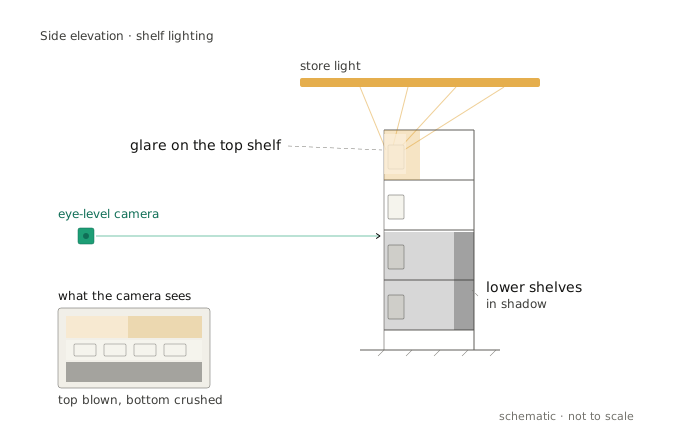
2. Check the lighting
In most cases the problem is light. Walk through:
- Are all the lights working?
- Have new shadows appeared (something moved, a new rack installed)?
- Are there new glares (a lamp replaced, extra lighting added)?
- Has natural light changed (a season change, curtains added or removed)?
3. Check camera positioning
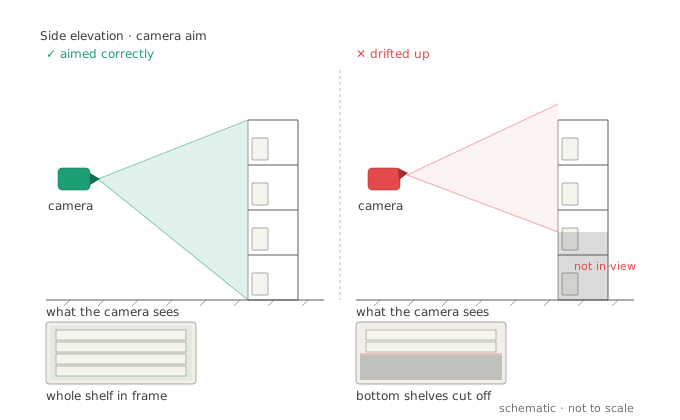
Cameras drift, tilt and get blocked. Check:
- Is it still pointing the right way, or has it moved?
- Is the lens clean (dust, droplets, condensation)?
- Is anything new blocking the view (a poster, a price tag, a hanging display)?
- Are there new obstacles in the frame (a fresh shelf or stand)?
The quick test: look at the current feed. Is the whole shelf visible, in focus, free of blur?
4. Judge frequency and severity
Not every error deserves attention.
An isolated error is rare (say 1 in 1000), on a non-critical product, under unusual conditions. Log it, add it to the dataset for the next retraining cycle, and move on.
A systemic error recurs on important products (bestsellers, promo items) under normal conditions. That makes it a priority. It’s affecting operations now, and fixing it pays back the time spent.
5. Collect data for the developers
If the simple fixes don’t hold, escalate with evidence:
- 10-20 example camera images of the error.
- Photos of the correct situation for comparison.
- A description: what should be there vs. what the system sees.
- Error frequency, as a percentage and an absolute count.
- The conditions under which it reliably reproduces.
A well-packaged error report is the difference between a same-week fix and a month of back-and-forth.
How many errors are normal?
A useful reality check, because “the system makes mistakes” is meaningless without a baseline. In typical retail conditions, 10-15% deviation is normal. What matters is catching and correcting it promptly.
Roughly:
- Large products, bright packaging, good light: 90-95% accuracy.
- Small, similar products, average conditions: 80-85%.
- A system in its first months: 70-80%, climbing to 85-90% within about six months as it learns your store.
Below 80% usually points to an equipment or configuration problem. The model itself is rarely the limit. Go back to the camera setup. Above 90% is an excellent result, but not always reachable for genuinely difficult assortments.
The point
Most “the model is wrong” tickets resolve at the lens or the lamp, well before the network weights. Treat errors as signal. A structured record of when and where they happen is the fastest route to a fix. It is also the training data that stops them recurring. A system that’s honest about its error rate is the one you can actually improve. The same argument runs through how we read accuracy metrics.