
SmartFeed: one product feed from many sources
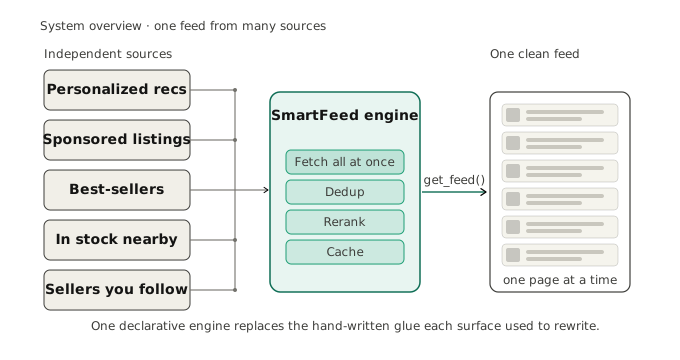
A product feed rarely comes from one place. A home or category screen blends personalized picks, promoted items, best-sellers and what is in stock nearby. Each of those is a separate backend: a system that serves that kind of item. Each has its own speed and hands out results in its own paged way. SmartFeed is the engine that stitches them into one scrollable feed. You describe the feed in a short config file. You plug in the functions that fetch your data, and ask for one page at a time. The engine handles the hard parts: fetching sources fast, removing repeats, re-ranking, caching, and keeping pages consistent as someone scrolls.
SmartFeed is our own open framework, a sibling to Datapipe. This post is the plain-language tour: what it solves, the mental model, and where it breaks. A companion integration guide covers what you implement.
Why a feed is hard to assemble
Stitching several backends into one clean feed is real work. You have to call every source, and call them together so the page is not slow. Duplicates that show up from more than one source have to go. You often re-rank the result with a model. You cache the work so scrolling does not hammer slow backends on every page. And the feed has to stay consistent while someone keeps scrolling. Historically each product surface wrote that glue code by hand, then rewrote it for the next surface.
SmartFeed replaces the hand-written glue with one engine you set up in config. You describe the feed as a small tree of nodes: which sources to use, how to blend them, and whether to cache, dedup or re-rank. Then the app calls one method per page. The payoff is speed of change. Adding a source, changing a blend from 40/60 to 30/70, pinning a sponsored slot, setting up an A/B test: each is a config edit. No code change, no redeploy.
The mental model: a feed is a tree
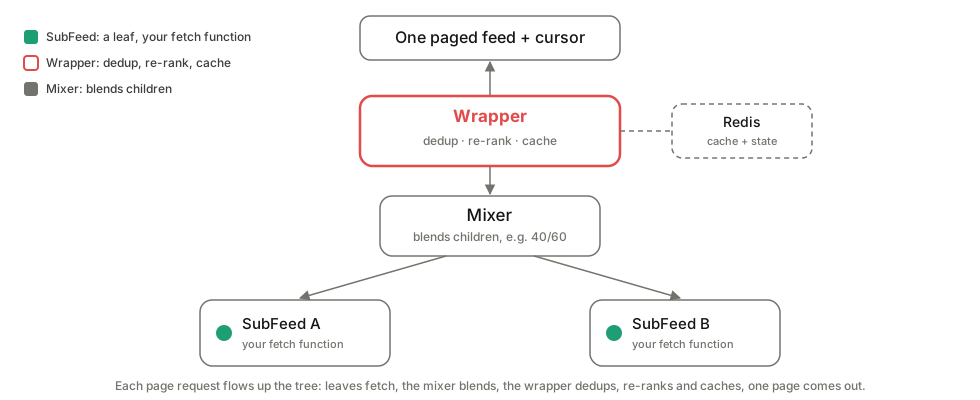
You do not need the internals to use SmartFeed, but the shape explains why changes stay cheap. A feed is a tree you describe in config, and every node is one of three kinds.
A SubFeed is a leaf. It wraps one of your own fetch functions and nothing more. It is the point where SmartFeed calls your code.
A Wrapper is a pipeline node. It sits in front of one source or a whole branch and adds optional steps: remove duplicates (dedup), re-rank, and cache. Each step switches on independently.
A Mixer is a combiner. It has several children, fetches them all at once, and merges them by a rule you pick. Mixer is an umbrella name for five blending strategies, covered below.
Nodes nest freely. A Mixer can hold Wrappers, which can hold other Mixers, as deep as you need. You hand the engine a page request. It hands back one page of items and an opaque cursor: a token you store and pass back to get the next page.
How one page gets built
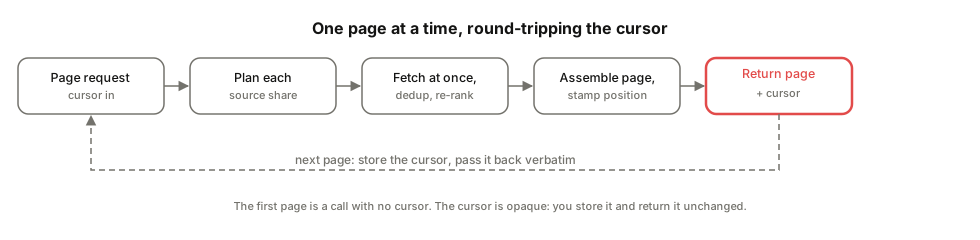
From the outside it is a short loop. The application builds the feed once, then asks for one page at a time. A request runs the pipeline: it plans each source’s share, fetches the sources at once, removes repeats, re-ranks and caches, assembles one page, stamps each item with its position, and returns the page plus a cursor.
The first page is not a special case: a call with no cursor is page one. Sources are fetched at once. So a page waits about as long as the single slowest source. It does not add them all up. The blend math happens before fetching: a rule like 40% from source A and 60% from source B becomes a concrete per-source count up front. Every item leaves stamped with its position and a note on where it came from. You can answer why an item showed up where it did, with no extra tracking.
Five ways to blend sources
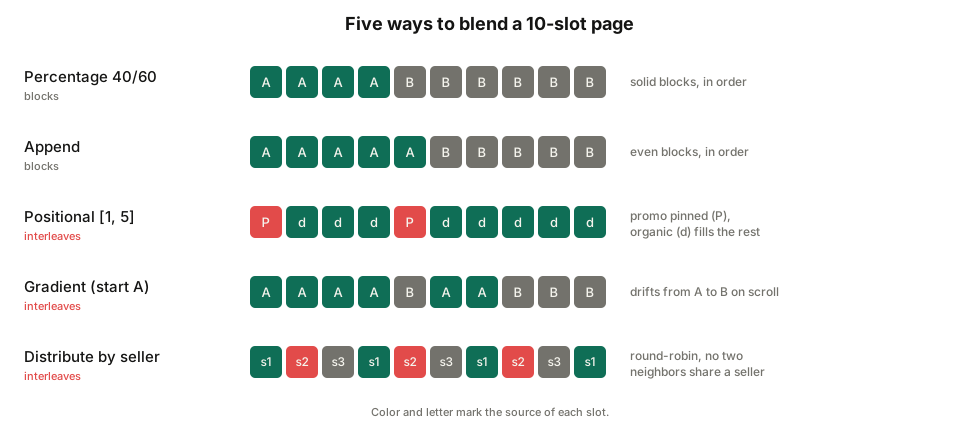
Mixers are the main lever a product team tunes, and the one thing to get right is that they do not all interleave. Two lay down solid blocks per source. The others weave items together.
Percentage splits the page by fixed shares, for example 40/60, and lays a solid block per source in config order. It fills a whole page only when the shares add up to 100.
Append concatenates several sources with an even split, in order, then trims to one page.
Positional pins one source to specific slot numbers and lets a second source fill the rest. This is how you place sponsored or featured items at guaranteed positions. If the pinned source runs dry, organic items fill the slot, so there is no hole. The slots are relative to each page: position 3 is the third slot of whichever page is fetched, and it repeats every page.
Gradient works like Percentage, but the ratio drifts one way as the user scrolls deeper. A feed can start on trending and best-sellers, then shift toward personalized picks further down.
Distribute pools all sources, optionally sorts them, then takes turns across them so no two neighbors are the same kind. This is the marketplace rule of no two items from the same seller in a row.
Staying fast as people scroll
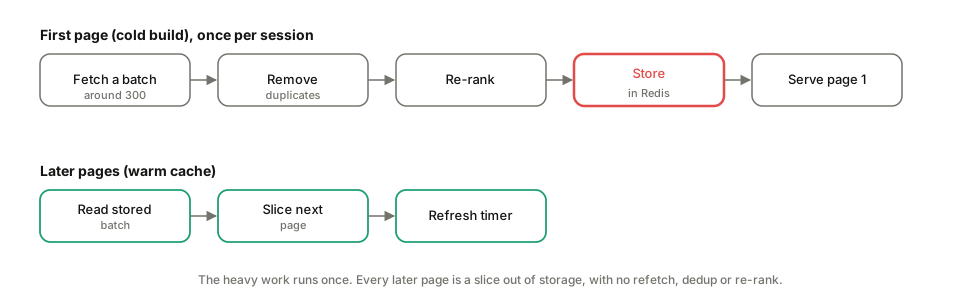
Caching keeps scrolling cheap, and it is opt-in per Wrapper. With a cache set, the first request in a browsing session does the heavy work once: it fetches a batch, for example around 300 items, dedups it, and re-ranks it, then stores the finished batch. Every later page slices the next chunk out of storage, with no repeat fetch, dedup or re-rank. When the batch runs out mid-session, the pipeline continues from where the source left off.
The cache lifetime is an inactivity timeout, for example around five minutes, refreshed on every page a person reads. Someone who keeps scrolling never loses their cache: it expires only after a stretch of no activity.
Consistency rides on a generation tag. Each fresh cache gets a random tag, stamped into both storage and the cursor. If a returning cursor no longer matches, because the cache expired and was rebuilt, SmartFeed rebuilds cleanly from page one. That trades a rare restart for never showing an inconsistent partial page.
Config changes invalidate caches on their own. Each cache entry is addressed by a fingerprint of its config: a short hash that changes the moment the config does. So any edit sends fresh data to a new address, and the old data ages out on its own. You never have to clear the cache by hand.
Two feed variants that differ only in how they re-rank can share one fetched pool. The fetch and dedup run once, and a short-lived lock makes sure only one caller does the cold fetch. That keeps an A/B test from doubling backend load. Even a feed that does not cache pages can still avoid repeats: SmartFeed keeps a record of already-shown item ids, so an item does not resurface on a later page.
What you can build with config alone
A few things a product team can ship without new code:
- A blended category page: reserve a share for in stock nearby and the rest for best match nationwide, with the Percentage mixer.
- Guaranteed sponsored placements: pin a promoted listing to fixed slots on every page, with organic results filling the rest, using Positional. It holds up when the promo source has nothing to serve.
- A feed that warms up: start on trending, then shift toward personalized recommendations as the user scrolls, with Gradient.
- A diverse marketplace page: sort by relevance or price, and never show two items from the same seller back to back, with Distribute.
- A cheaper A/B test: compare two re-rankers over the same item pool without doubling backend load.
- A resilient feed: let one flaky backend fail softly so the rest still fill the page.
Where it breaks
Redis, a fast in-memory data store, carries the most valuable features. Session caching, cross-page dedup memory, and shared A/B fetches all rely on it. Without Redis a cached feed still works, but it runs uncached, and an item shown earlier can reappear later.
Graceful failure is opt-in, per source. By default, one failing source or a failed re-rank fails the whole page request. To get one source down and the rest still rendering, you set a flag on the sources you want to degrade softly. The host app should still catch errors for a friendly failure screen.
“At the same time” means the sources run together. It does not mean you need more servers or CPUs. Because they run together, the wait stays close to the slowest source, well under the total of all of them. This fits backends that spend their time waiting on other systems, which is the usual case here.
Percentage and Append lay down blocks. A 40/60 split is a block of one source followed by a block of the other. Interleaving comes from Positional, Distribute and Gradient. It is worth saying, because a percentage split sounds like an even mix when it actually lays down blocks.
Distribute costs more backend traffic than it shows. To build a good diverse order it asks every source for a full page, then keeps only a page’s worth across all of them. So it pulls several pages of data to emit one: that is by design, and worth sizing for.
On cache loss, it rebuilds from page one. A returning user whose cache expired sees a clean rebuild. It does not resume mid-feed. This is deliberate: a clean rebuild never shows a broken page, even if it costs the reader their place.
We claim no latency or throughput numbers here. The test suite demonstrates the behaviors above. Measure any speed or cost figure against your own sources and traffic.
If you are weighing SmartFeed for a real feed, the Search and Recsys page has where it fits and what it costs.