Automating price-tag and promo checks
Picture a normal morning. A manager gets a list of 20 items with new prices. An associate has to find each product, print a tag, pull the old one, and put up the new one. A dozen other tasks compete for attention at the same time. Keeping every tag current by hand is hard.
Meanwhile shoppers are already in the store. They pick a product at the shelf price and meet a different price at the till. That reads as deception, and it sticks. Now multiply it across 50 stores and tens of thousands of SKUs.
Why manual checks fall behind
The classic method is a person walking the floor with a tablet, comparing tags against reference data. Three problems pull against it: scale, the human factor, and no real visibility.
Scale comes first. A supermarket carries around 3,000-5,000 products. Even at an unrealistic one tag a minute, a single pass eats a whole workday.
Then the human factor. People tire, lose focus, and rush, which makes more errors. Each issue then has to be recorded, assigned, and chased to a fix.
Manual checks are also blind. There is no reliable analytics and no clear picture per store, so decisions get made on impression. With store-level data across the network, you can act where it actually helps.
How automation helps
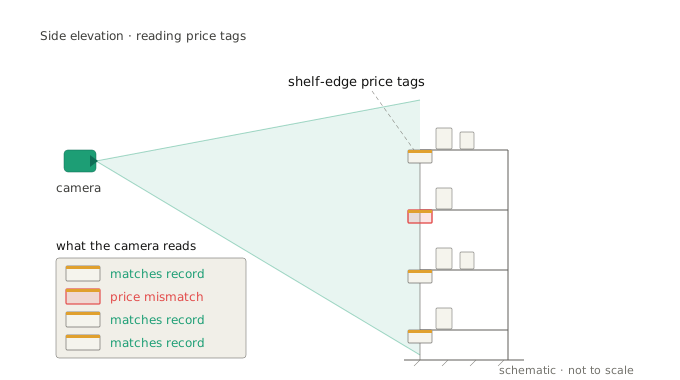
Camera-based monitoring tells you what is on the shelf and what is printed beside it. The system reads images of the floor, matches each product to its price tag and database record, and flags the discrepancies on its own. Staff fix only the tags or displays the system marks. You get accurate analytics, fewer fines and complaints, and steadier revenue.
How the system works
It runs in stages, each passing its result to the next:
- Cameras capture shelf images on a schedule.
- The system detects products and price tags, and reads their names and SKUs.
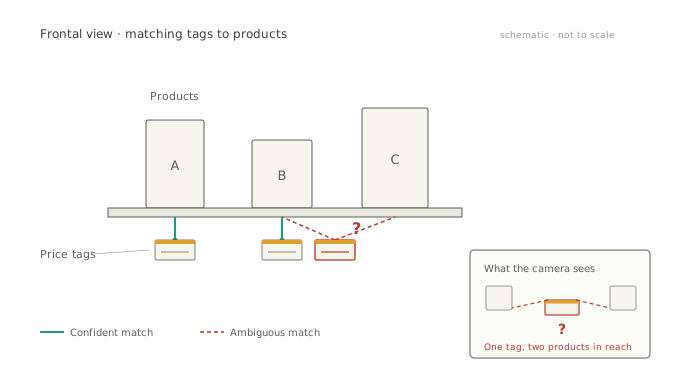
- It matches each tag to the right product, which is not trivial, since tags shift and products move.
- It checks the tag against the inventory system.
- On a mismatch, it sends an alert at once.
The hardest stage is matching each tag to the right product. A tag can drift sideways and sit between two items, and the system then has to decide which product it belongs to.
The stages stay the same. The details adapt to each store.
Getting it right
A few things keep a rollout honest:
- Start with a pilot. Run a few stores or one category first. The early weeks show where the model holds and where it slips. Get the camera setup right here, because a tag the lens can’t resolve can’t be checked.
- Route hard cases to a person. Poor images, odd tag formats, and ambiguous scenes should go to manual review. That feedback retrains the model.
- Keep price and promo data current. Promotions and new products land weekly. Stale reference data makes the system flag errors that aren’t real.
- Tell staff it is there to help. It takes over the repetitive check of thousands of tags and hands back short, clear tasks.
The same pixels that recognize a product read its price tag. Done well, the shelf price and the till price finally agree.