
Detecting camera drift on retail shelves
Our note on the input quality gate ends a section on camera shift with a confession. The first detector matched the top 60 SIFT keypoints between two frames, computed one global shift vector, and caught only around 15-20% of real shifts. This is the rebuild. We rebuilt the shift detector about five times over two years. The version in production now uses LightGlue feature matching, a small ResNet, and a YOLO check. It runs on four parameters where the old stack had more than twenty-five. On a validation export it reached around 94% accuracy with a mean error near 4 pixels.
Camera drift is the most relatable failure in the whole system. A cleaner bumps a camera, a restock knocks it, a mount loosens. The picture moves a few pixels or a few degrees. The viewport no longer lines up with the shelf, and recognition quietly falls apart for that camera until someone notices.
A shift, and why it hides
Each camera has hand-drawn viewports: rectangles that mark where the products and price strips sit. Every detector runs inside them. When the camera moves, the viewport points at the wrong place, and nothing downstream knows.
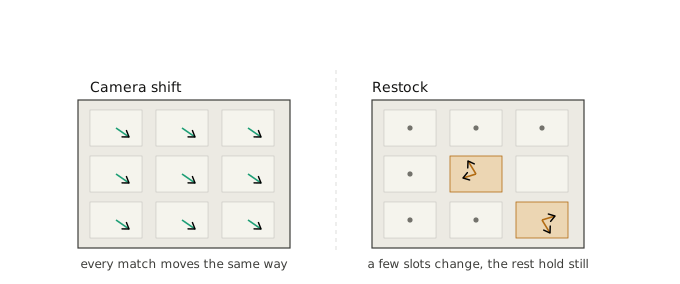
The hard part is telling a camera shift from a restock. Both change the picture. A shift moves the whole scene by one vector. A restock changes the contents of a few slots while the camera holds still. Almost every rule we added over two years exists to tell those two apart. We grade the result by severity. There is no shift, a small shift we can auto-correct, a large shift, and an unknown bucket. The unknown bucket holds obstacles, darkness, or a camera knocked right off its shelf.
The long climb
The production baseline matched ORB keypoints and took a global shift vector. It fired too often on big shifts. We moved to SIFT keypoints with a three-sigma threshold, which cut false alarms on small shifts but still missed the large ones. Then we added RANSAC to estimate a single translation and throw out the keypoints that disagree, which is exactly the restock case. RANSAC pushed small-shift detection up sharply. Large angled shifts stayed hard.
One early idea turned out to be a trap. Sampling keypoints inside the viewports meant sampling the very products that change on a restock, so the detector tripped on its own blind spot. The fix was to look outside the products. Another bug was quieter and worse. When too few keypoints matched, the function returned zero, which read as a strong shift. Plastic film over a lens, a dark frame, or a full product swap all produce few matches. So the detector raised a shift exactly when it should have stayed silent. We changed the default to report no shift on too few matches.
Rules, then a small model
By 2025 the SIFT pipeline carried a set of hand rules to catch restocks. If a tenth of the keypoint matches sit near zero movement, it is a restock. If the shifts spread wide on one axis with no clear direction, it is a restock. If they point both left and right at once, it is a restock. A per-axis threshold scaled to the image size flags anything larger as suspect.
On top of the rules we added a small classifier. It takes the difference between the two frames and sorts it into no shift, small shift, or large shift with a ResNet-34. We picked ResNet-34 over a more accurate EfficientNet because it ran in around 150-250 milliseconds on a store CPU against 350-600 for the alternative. A separate optimization cut the CPU time on one heavy camera from around 14 seconds to under one. It resized frames before inference and searched keypoints only inside the viewports.
The 2025 rebuild: fewer parts, fewer knobs
The stack had grown to seven decision branches, about fifteen steps deep, and more than twenty-five parameters. We rebuilt it around LightGlue, a modern learned feature matcher. The new pipeline has four branches and four parameters: the match count, the shift size, a detector-confidence ratio, and an overlap.
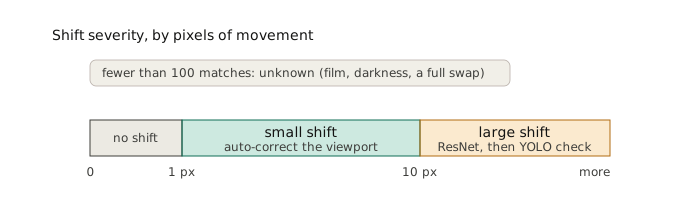
It decides in stages. Match keypoints with LightGlue and take the median displacement, which is steadier than the mean on outliers. Fewer than a hundred matches means film, darkness, or a swap, so it reports unknown. A shift of a pixel or less is no shift. Up to ten pixels is a small, auto-correctable shift. Past ten pixels it calls the ResNet. If that says large, a YOLO detector confirms the fixtures and price strips still line up before raising the alarm.
On a validation export of around 13,000 frames it reached around 94% accuracy and a mean error near 4 pixels. A handful of frames still blew up to hundreds of pixels, which is why the YOLO check exists.
Fix it or flag it
A small shift does not need a human. The system moves the viewport by the measured vector and carries on. A large or unknown shift opens a task for a moderator. The split is the whole point. Across stores, roughly 60% to 90% of shifts were auto-correctable, depending on the camera mix. The count of cases a moderator handled each day fell by around two and a half times.
What broke, every time
The failure modes repeated across versions. Overexposure washed out the SIFT keypoints, which is how the first version landed at 15-20%. That argument is in the input quality note. Restocks kept reading as shifts until the rules caught them. Rotations and perspective changes stayed the hardest case. In the rebuild, of the thirty large shifts flagged on one export, only nine were truly unfixable. All nine were a changed perspective or a camera knocked fully off. Wide-angle cameras drift by one or two pixels in ways that are hard to judge even by eye. And a camera that loses focus produces frames sharp enough to look shifted.
Five things we took away
Separate a shift from a restock first. Both move the picture, and most of the engineering is the difference between a scene that translated and a shelf that changed.
Do not sample where the content changes. Keypoints inside the viewport sit on the products that get restocked, so they trip the detector on purpose.
A wrong default is worse than no detector. Returning a strong shift on too few matches fired the alarm on dark and blocked frames, the exact cases to ignore.
Fewer knobs beat a clever maze. The rebuild went from twenty-five parameters to four and got more accurate, because each removed branch was a place to be wrong.
Measure the pixels. A mean error near 4 pixels tells you more than an accuracy percentage, and it surfaced the rare frames that blow up to hundreds.
The detector lives inside the input quality gate. The whole system is mapped in the pipeline overview. Once it met real stores, the model was rarely the problem. That is the production reality check. If you are scoping a build like this, the shelf-monitoring use-case is where it becomes a project.