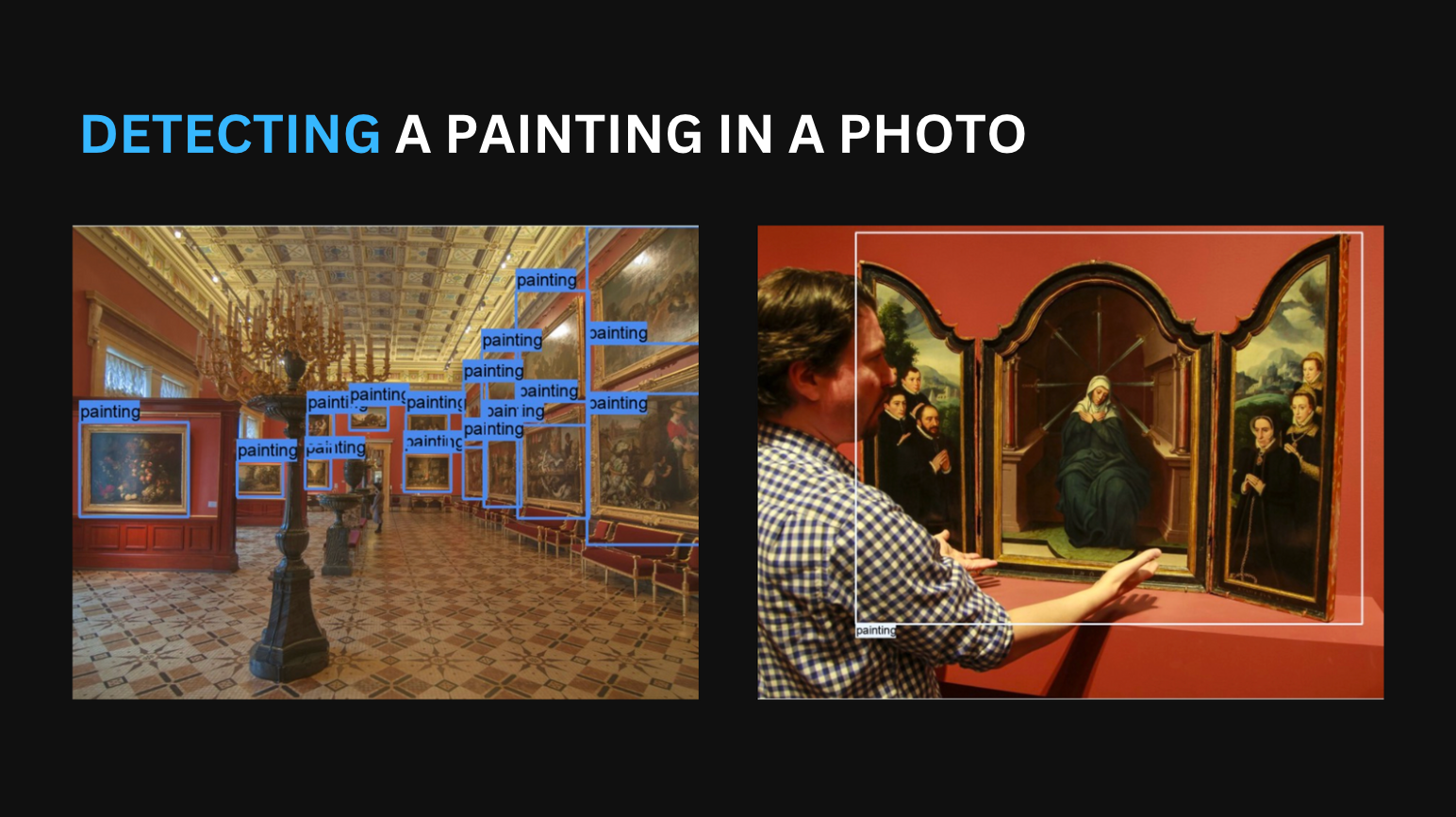
If your customers know what they want but not what it's called, this is the search you need
Visual search that handles real-world photos, bad lighting, dozens of objects in one frame, items the customer doesn't know the name of. Built and battle-tested at Brickit-scale (millions of users, thousands of classes).
Discuss a pilot →Quick facts
- Business size
- Mid-market to enterprise, anyone with a catalogue of 500+ visually distinguishable items
- Timeline
- 3-6 weeks test, 2-3 months pilot, 3-6 months to production-grade mobile
- Budget range
- Pilot starts at €35k. Mobile-deployed versions cost more than cloud-only, the on-device optimization is real engineering.
- Hardware
- Cloud inference works for many catalogues. Mobile on-device (CoreML / TF Lite) for real-time UX.
- Data needed
- Reference images per SKU (3-10 per item from typical angles), or a 3D model from which we synthesize training data.
- Evolution
-
- Genesis
- Custom-built
- Product
- Commodity
A vendor sells this result ready-made. We set it up and tune it to you.
What this scale means
Further right means more proven and cheaper. Further left means newer and riskier. Here is the test for each step.
- Commodity
- You could get the result yourself from a ready service, with almost no work. We rarely take these on.
- Product
- A vendor already sells this result turnkey, like shelf recognition from Trax or document reading from ABBYY. If one of them fits you, use it. You come to us when it does not: when it has to run on your own servers, cost less, or fit systems the product cannot reach.
- Custom-built
- Vendors sell only the parts. A tool like Tableau hands you charts, but the dashboards and metrics for your business still have to be built. That build is the work, and that is us.
- Genesis
- The approach exists but does not work reliably yet. You are betting on it maturing, so it costs more and carries more risk.
Expected outcomes
The Problem
Customers know what they want. They often don’t know what to type. The plastic part with the funny notch that broke off the kitchen tap. The lamp they saw at a friend’s house. The piece of jewellery in a museum case. The single LEGO brick they need to finish a set.
Keyword search fails here. Faceted filters fail here, there’s no facet for “the small thing that looks like a Y”. What the customer has is a photo, and what they need is a match.
Visual search has been a “future feature” for a decade because doing it well is harder than it looks. The demos run on clean product photos against a white background. Real customers shoot dim phone pics of cluttered piles, at weird angles, with multiple objects in frame. Most off-the-shelf visual search SDKs collapse under those conditions.
What the Solution Does
A camera-first product matcher: customer points their phone, the app returns ranked catalogue matches, optionally with confidence scores, alternatives, or “this looks like a 70% match, was it one of these?”.
- Capture, phone camera or web upload. Single object or whole-scene.
- Detect, locate every relevant object in the frame, with bounding boxes.
- Classify, match each detected object to your catalogue. Returns top-N with confidence.
- Rank and present, combine confidence with business rules (in stock, price, customer history) for the final list.
- Learn, every “yes that’s it” and “no it wasn’t” from the user becomes training signal for the next retraining cycle.
Where It Fits
This makes sense if you…
- Sell catalogue items that are visually distinguishable (clothes, parts, jewellery, lighting, building blocks, books)
- Have customers who arrive with a photo or an item they can photograph
- Have at least a few reference images per SKU, or 3D models you can render
- Care about mobile UX, speed matters, on-device might matter
- Have an iOS / Android app, or are ready to add a camera flow to your web checkout
This is probably not the right time if you…
- Sell items that look identical but differ in invisible specs (two versions of one chip, different software licenses)
- Have a catalogue that changes weekly with no time to collect reference images
- Need 99.9%+ accuracy on adversarial inputs (counterfeits, deliberately misleading photos), that’s a separate problem
- Want this as a UX nice-to-have without a clear traffic plan, visual search shines when customers actually use it
Business Value
The straight answer on visual search: it is a capability that compounds over time. It is not a feature you bolt on for ROI in the first quarter.
Where it pays off fast. Niches where customers hold something physical and don’t know what to search for: replacement parts, hobby items (LEGO, board game pieces, model kits), thrift and second-hand, jewellery, decorative lighting. On those, conversion lift on visual-search-completed sessions can be substantial. The lift depends heavily on the baseline, so we report conservative ranges in expected outcomes and confirm per project.
Where it pays off slowly. General e-commerce where keyword search and filters already work. Visual search becomes a “for cases search can’t handle” pressure-release valve, which is real value but harder to measure on a quarterly basis.
Where Brickit-scale matters. The Brickit app, which our team built, recognizes LEGO bricks from a pile photograph using a classifier that covers 1,200+ part types. It runs on the phone, has millions of users, and was the subject of a Highload conference talk in 2026. Most “visual search” pitches you’ll see are demos. We’ve shipped the production-and-scale version.
How It Works
The textbook diagram is photo, then CNN, then answer. That works on Kaggle. On real catalogues with thousands of classes and crowded frames, you need a more realistic pipeline. Here’s what we actually ship.
1. Detection, find the things
A YOLO-based detector (we’ve used YOLOv3 historically, Centernet for high object-density scenes like Brickit, more recent YOLO variants for newer projects) locates every catalogue-relevant object in the image. Crops each one. This is the cheap, fast stage.
Centernet is our go-to for scenes with lots of small objects of similar size (the Brickit case, a single pile photo can hold 1,500-2,000 bricks). It’s overkill for catalogues where the customer photographs one item at a time.
2. Classification, match to catalogue
Each crop goes through a classifier (ResNet50 or similar) trained on your specific catalogue. Output: top-N matches with confidence scores.
We separated detection and classification deliberately. Single-pass models (YOLO doing both) work fine up to ~150-300 classes; past that, classification accuracy drops sharply and the errors get strange. A two-stage pipeline is slower (2-10 seconds per pile-of-objects image) but gives much higher accuracy on large class counts.
3. Synthetic data, because real data is expensive
For most catalogues you can’t realistically photograph every SKU from every angle. We render synthetic training images from 3D models, this is how we trained Brickit on hundreds of classes before a single real photo existed. Synthetic data is never sufficient on its own; we use it as a baseline and fine-tune on real user photos as they come in.
4. Continuous retraining, Datapipe
Every project ships with Datapipe, our open-source ETL/MLOps framework. New SKUs, new failure cases, new data: Datapipe figures out what changed and retrains only the affected parts. It never rebuilds the whole pipeline from scratch. This is what makes the system survive a year in production.
5. Mobile deployment, CoreML / TF Lite
For real-time UX, models run on-device. We convert the trained pipeline to CoreML (iOS) and TF Lite (Android), with the quantization and operator-fusion work required to fit a classifier that covers 1,200+ part types into mobile memory budgets. The 2026 Highload talk covers this in more detail.
Stack
YOLO family (v3 / v5 / v8), Centernet for high-density scenes, ResNet50 / EfficientNet for classification, Datapipe for the training pipeline, Label Studio for annotation, CoreML / TensorFlow Lite for mobile inference. Cloud: AWS / GCP. Edge: phone, Jetson family.
What You Need to Make This Work
Data. Reference images per SKU (3-10 per item from typical angles), OR 3D models for synthetic data generation, OR a way to do a data-collection sprint at the start. If your catalogue has none of these, that’s a separate 4-8-week prep project before pilot can start.
Integrations. Your catalogue API or DB (for the matched-result lookup). A target surface, mobile app, web with camera access, or in-store kiosk. For mobile: model deployment slot in your app’s release pipeline.
Hardware. Cloud inference is fine for many catalogues. Mobile on-device is necessary for sub-second UX or offline use (museums, low-connectivity retail). Mobile adds 2-4 weeks of optimization work per platform.
Team. A product owner who’ll decide trade-offs (top-1 accuracy vs latency, on-device size vs accuracy). Annotation labour for real photos, we can run this on our side or hand off to your team. A mobile / web dev contact for the integration (~20-40 hours during pilot).
Implementation Roadmap
1. Test (3-6 weeks)
Pick 50-200 SKUs from the catalogue (often “the top sellers” or “the ones customers complain they can’t find”). Train the first version. Measure baseline accuracy on your real conditions: dim phone shots, clutter, odd angles. Cleaned demo photos tell you nothing useful. Decide single-stage vs two-stage, cloud vs mobile, synthetic data vs real-only. Output: a written technical report with measured numbers and a clear pilot scope.
2. Pilot (2-3 months)
Scale to a meaningful catalogue slice (1,000-5,000 SKUs). Production deployment to a single platform (usually mobile). Real-user testing, A/B against existing search, or rollout to a beta cohort. Mobile model optimization happens here. Output: working app surface, measured business metrics, go/no-go on full rollout.
3. Scale (3-6 months)
Full catalogue. Multi-platform (iOS, Android, and web). Continuous retraining pipeline running unattended. Quarterly accuracy reviews. By the end, your team can add new SKUs without our involvement; we stay on for retraining oversight and edge cases.
Keep in Mind
Things visual search will not do, that customers and product managers sometimes assume it will:
- Tell counterfeits from originals. Recognizing “this is a Louis Vuitton bag” and recognizing “this is a real Louis Vuitton bag” are different problems. Counterfeit detection is a separate use case with materials-level analysis.
- Find products you don’t have a reference for. New SKUs are flagged “unrecognized” until we collect images and retrain. This typically happens daily-to-weekly in production; turning it around within a day is possible but expensive.
- Work equally well in any lighting. Drastic lighting (UV, very low light, strong shadows) degrades accuracy. We measure this during pilot and surface the threshold below which the assistant asks for a better photo. Below that line it should never guess.
- Replace structured filters. Customers who know what they want will still type. Visual search complements text search; it doesn’t replace it.
- Be free to operate. Continuous retraining costs compute time. Plan for ongoing GPU spend, especially as the catalogue grows.
FAQ
How many reference images do we need per SKU?
For a pilot, 3-5 images per SKU from typical user angles is the floor. For production-quality on a large catalogue, expect to add 10-30 real user photos per SKU over the first 6 months of operation. Synthetic data (from 3D models) reduces this if you have models.
Cloud or on-device?
Depends on UX. If the use case is “customer at home pointing their phone”, cloud is fine, latency budget is generous, model size is unconstrained. If the use case is “scan a pile of objects in real time”, you want on-device. Mobile deployment is real work (2-4 weeks per platform); plan accordingly.
Can this handle multiple items in one frame?
Yes, that’s the Brickit case. Detection finds all of them; classification runs on each. End-to-end latency scales roughly linearly with object count, so a 1,000-brick pile takes 5-10 seconds on a modern phone.
How does retraining work in production?
Datapipe tracks data dependencies. When you add new SKUs or new annotation, only the affected branches of the pipeline rerun. Typical retraining cadence is weekly to monthly depending on catalogue churn.
What if a customer photographs something that isn’t in our catalogue?
The classifier returns a low confidence score. We treat anything below a threshold as “not found” and never guess. We collect those low-confidence cases to inform future catalogue or training decisions.
Ready to Discuss?
Visual search is a use case where bad demos are very common and good production deployments are rare. If you’re considering it for your catalogue, the most useful conversation starts with what your customers are actually trying to find and what data you have. We’ll tell you whether it’s a 6-week pilot or a 6-month project for your specific case.